Genau! Haben will!

Cooper Controls release Level 6 Android Remote

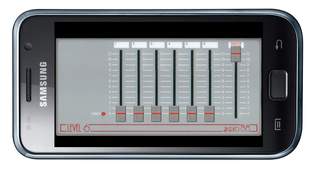
1st Apr 2011 – Cooper Controls are pleased to announce the launch of their new Android Remote for Level 6.
Level6Android.jpg

Cooper Controls are pleased to announce the launch of their new Android Remote for Level 6.
Following the fantastic feedback for their ZerOS Remote for Android application launched last month, Zero 88 have developed a method for controlling their entry level control product, the Level 6 DMX, using an Android mobile device.

The Level 6 Android Remote enables control of channels 1, 2, 3, 4, 5 and 6, together with a Grand Master function. As an added feature, controls on the Level 6 Android Remote go to 11, for when you need that extra brightness.
As the Level 6 DMX does not support networking, the engineers at Cooper Controls have designed a method for communicating between the Level 6 and the Android tablet. This new technology, known internally as the Human Android Neurological Device (H.A.N.D.), provides the optimum interface for linking the operator directly to the Level 6 DMX. An expandable design, multiple H.A.N.D.s can be utilised to grow your system to control more lights, along with multiple Level 6s. For professional lighting designers, an accessory for H.A.N.D. has been developed – the Growing Lx Operators Vast Ego (G.L.O.V.E.). By using G.L.O.V.E, professional designers can take a truly ‘H.A.N.Ds off’ approach.

For extremely large systems, it may be preferable to order an Android Sustaining Support Instance (Student) To Automate Neurological Transfer (A.S.S.I.S.T.A.N.T.) to provide a distance between the Android and the Level 6. A.S.S.I.S.T.A.N.Ts are now available from all major drama colleges, and come with a 3 year ‘return to base’ warranty. In the event of malfunction, simply send your A.S.S.I.S.T.A.N.T. back to their origin for reprogramming.

You can download the Level 6 Android remote from the Android Marketplace from April 1st.
InfraROT … aber wie????

Dauernd kommen die Fragen nach dem „Wie geht das mit dem Infrarot?“ Wie kann ich meinen butler denn mit einer billigen günstigen Infratfernbedienung fernsteuern?“ und besonders beliebt ist die Frage: „Wie funktioniert das mit dem Philips RC-5 ???“

Hier ist nun die Antwort:

Philips RC-5 Protocol 


The RC-5 code from Philips is possibly the most used protocol by hobbyists, probably because of the wide availability of cheap remote controls. 
The protocol is well defined for different device types ensuring compatibility with your whole entertainment system. Lately Philips started using a new protocol called RC-6 which has more features. Features 

5 bit address and 6 bit command length (7 command bits for RC5X)
Bi-phase coding (aka Manchester coding)
Carrier frequency of 36kHz
Constant bit time of 1.778ms (64 cycles of 36 kHz)
Manufacturer Philips

Modulation 
The protocol uses bi-phase modulation (or so-called Manchester coding) of a 36kHz IR carrier frequency. All bits are of equal length of 1.778ms in this protocol, with half of the bit time filled with a burst of the 36kHz carrier and the other half being idle. A logical zero is represented by a burst in the first half of the bit time. A logical one is represented by a burst in the second half of the bit time. The pulse/pause ratio of the 36kHz carrier frequency is 1/3 or 1/4 which reduces power consumption. 

The first two pulses are the start pulses, and are both logical „1“. Please note that half a bit time is elapsed before the receiver will notice the real start of the message. 
Extended RC-5 uses only one start bit. Bit S2 is transformed to command bit 6, providing for a total of 7 command bits. The value of S2 must be inverted to get the 7th command bit though! 

The 3rd bit is a toggle bit. This bit is inverted every time a key is released and pressed again. This way the receiver can distinguish between a key that remains down, or is pressed repeatedly. 
The next 5 bits represent the IR device address, which is sent with MSB first. The address is followed by a 6 bit command, again sent with MSB first. 
A message consists of a total of 14 bits, which adds up to a total duration of 25 ms. Sometimes a message may appear to be shorter because the first half of the start bit S1 remains idle. And if the last bit of the message is a logic „0“ the last half bit of the message is idle too. 

As long as a key remains down the message will be repeated every 114ms. The toggle bit will retain the same logical level during all of these repeated messages. It is up to the receiver software to interpret this auto repeat feature. 

PS: I had rather a big error on this page for quite some time. For some mysterious reason the LSB and MSB of the address and command were reversed. I can recall correcting this error before, but somehow an old version of the description must have sneaked its way up to the internet again. Pre-defined Commands 


Philips has created a beautiful list of „standardized“ commands. This ensures the compatibility between devices from the same brand. 
A very nice feature, often to be missed with other brands, is the fact that most devices are available twice in the table allowing you to have 2 VCRs stacked on top of each other without having trouble addressing only one of them with your remote control. 
I can only show a limited list of standard commands, for this list is about all I know right now. RC-5
Address Device
$00 – 0 TV1
$01 – 1 TV2
$02 – 2 Teletext
$03 – 3 Video
$04 – 4 LV1
$05 – 5 VCR1
$06 – 6 VCR2
$07 – 7 Experimental
$08 – 8 Sat1
$09 – 9 Camera
$0A – 10 Sat2
$0B – 11  
$0C – 12 CDV
$0D – 13 Camcorder
$0E – 14  
$0F – 15  
$10 – 16 Pre-amp
$11 – 17 Tuner
$12 – 18 Recorder1
$13 – 19 Pre-amp
$14 – 20 CD Player
$15 – 21 Phono
$16 – 22 SatA
$17 – 23 Recorder2
$18 – 24  
$19 – 25  
$1A – 26 CDR
$1B – 27  
$1C – 28  
$1D – 29 Lighting
$1E – 30 Lighting
$1F – 31 Phone
  RC-5
Command TV Command VCR Command
$00 – 0 0 0
$01 – 1 1 1
$02 – 2 2 2
$03 – 3 3 3
$04 – 4 4 4
$05 – 5 5 5
$06 – 6 6 6
$07 – 7 7 7
$08 – 8 8 8
$09 – 9 9 9
$0A – 10 -/– -/–
$0C – 12 Standby Standby
$0D – 13 Mute  
$10 – 16 Volume +  
$11 – 17 Volume –  
$12 – 18 Brightness +  
$13 – 19 Brightness –  
$20 – 32 Program + Program +
$21 – 33 Program – Program –
$32 – 50 Fast Rewind
$34 – 52 Fast Forward
$35 – 53 Play
$36 – 54 Stop
$37 – 55 Recording 

Oder, noch besser, schaut einfach mal hier nach: http://www.sbprojects.com/knowledge/ir/rc5.htm

Jaa nee is klar, ne?

Da haben wir die Tage ein nettes kleines Projekt fertigstellen wollen, kommt doch im letzten Augenblick ein neuer schlauer Mensch dazu.
Soweit so gut, hatte sich der besagte Mensch doch bisher nie sehen lassen, also erstmal Guten Tag.

Das ist doch ein Windows-Rechner den Sie dort nutzen?“
Ja, sehr gut erkannt. Da läuft unter anderem e:cue drauf und eine unserer Speziellen Kleinen Applikationen (SKA).

Wo ist den die Hardware-Firewall?
Ja, nirgendwo, das stand nicht in der Leistungsbeschreibung. Wieso brauchen wir die denn? Dieser Rechner ist mit nix vernetzt und ganz alleine hier.

Na, wenn sich jemand von aussen hier reinhacken will…
Warum sollte er das tun? Und was würde er finden? Eine Software die DMX produziert. Damit kann er nix anfangen, wahrscheinlich wird er es nicht mal verstehen…

Ja, das geht aber nicht, da gibt es Vorschriften, das ist doch klar
Ja, habe ich den eine Glaskugel für Vorschriften auf dem Schreibtisch stehen? Vernagele ich mir meine Cases?

Ausserdem, was ist mit den Updates?
Was für Updates?

Na, die von Windows!
Nix ist damit, die sind abgeschaltet. Der Rechner hat alles was er braucht und mehr bekommt er nicht.

Na, ohne Updates geht der Rechner doch kaputt!

Neue Software und tolle Erklär-Videos

Da gibt es eine Firma die mit Beleuchtung zu tun hat. Gibt es ja einige.

Diese spezielle Firma nun ist schon längere Zeit hier in Deutschland richtig totgesagt bzw.geredet worden. Auch das passiert einigen Firmen, gerade jetzt zu dieser Zeit.

Aber unbeachtet davon haben die Herren Programmierer, die im Dienste dieser Firma stehen, ein wundervolles Stück Software geschaffen. Die Rede ist von der Palette, die neue Lichtsteuerung der Firma Strand Lighting.
Wie es sich gehört, gibt es die Hardware in unterschiedlichen Ausführungen, für jeden Zweck ein passendes Modell. Und wie es sich gehört, ist die Software immer die gleiche. Das macht das Lebnen einfacher.

Die Software hat es aber so richtig in sich. Unglaublich viele Funktionen. Features ohne Ende. Programmieren mit Moving Lights macht plötzlich wieder Spass. Shows bauen auch. Shows abfahren erst recht. Featureliste und Fotos von den Konsolen unter www.strandlighting.com

Unter uns gesagt braucht sich die Palette nicht hinter der Oma oder der Eos verstecken, eher im Gegenteil!
Davon sind auch eine Menge Menschen auf dieser Welt überzeugt und so hat sich mein Freund John aus Australien die Mühe gemacht alle Funktionen und Features der Konsole in einem Video zu erklären.
Zu finden ist dieses Prachtstück vom „Erklär-Bär“ unter: http://www.youtube.com/user/DrGisBoH